


myWisely: Mobile Banking
4.312.13K Reviews
App Specs
- Version
- 26.6.0
- Updated On
- License
- Free
- Downloads
- 5,000,000+
- Developer
- ADP, INC.
- Categories
- Finance
- Platform
- Android, iOS
Screenshots

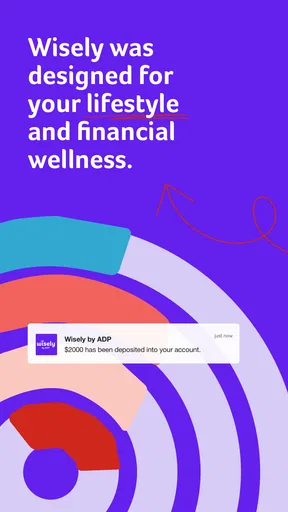

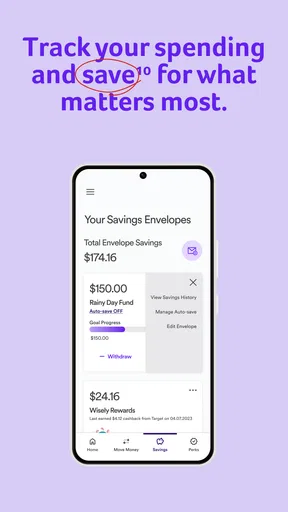
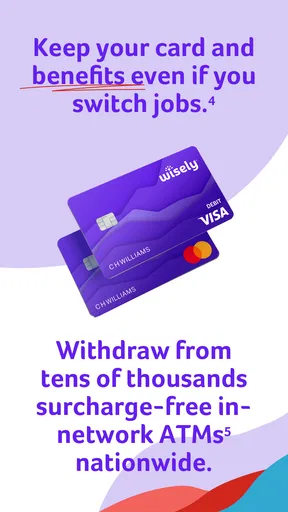
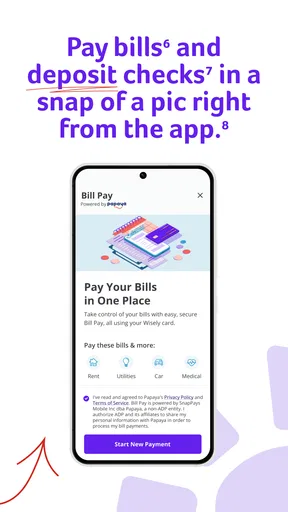
 Analysis by AppCompare
So, I’ve been diving into myWisely: Mobile Banking lately, and let me tell you, this app is like having a financial wizard right in your pocket. If you’re anything like me and want to keep track of your money without the headache, you might want to give this a shot. Let’s break down why this app might just become your new money-managing BFF.
Your Money, Your Way
First off, the setup process is a breeze. You download myWisely: Mobile Banking, and voila, you’re on your way to financial freedom. The app offers a slick interface that’s both intuitive and easy on the eyes. Trust me, even if you’re not a tech wizard, you’ll find your way around this app in no time.
What caught my attention is how it allows you to manage your finances with such ease. You can track your spending, set up budgets, and even get insights into your spending habits. It’s like having a personal financial advisor whispering sweet money-saving tips into your ear. And who doesn’t love that?
Features That Shine
One of the standout features is the instant notifications. Every time there’s a transaction, you get notified instantly. This means there’s no more surprise "where did all my money go?" moments at the end of the month. You can keep tabs on every dollar, every step of the way.
Oh, and let’s not forget about the budgeting tools. They’re super customizable. You can set up your own categories, and the app will give you a detailed breakdown of your spending. It’s perfect if you’re trying to save up for something special or just want to avoid those impulse buys.
Security You Can Trust
Now, let’s talk security because, let’s face it, nobody wants to mess around when it comes to their hard-earned cash. myWisely: Mobile Banking doesn’t skimp on this. They use top-notch encryption to keep your data safe and sound. Plus, with biometric login options, you can rest easy knowing your account is protected.
And if you ever lose your card or phone, the app has you covered with quick card lock features. It’s like having a safety net for your finances, ensuring that peace of mind is just a tap away.
Worth Reading Before You Choose

EA SPORTS FC Mobile 26 Is a Bigger Football Game, but It Takes Time

Flipboard Shows What News Apps Must Do Beyond the Feed

Switching to Android Auto Means Rethinking Your Driving Routine

Google Calendar Makes a Crowded Week Easier to Manage

Ludo King Makes the Most of the Minutes Between Plans

Baby Panda World Brings Quick Play to Modern Phones, but Its Game Library Feels Busy
A Little Something Extra
Now, here’s a little something that really sets this app apart: the rewards program. I mean, who doesn’t love getting rewarded for spending? It’s like getting a pat on the back for being a savvy spender. You can earn points and redeem them for various perks, making your financial journey a tad bit sweeter.
And if you’re someone who loves sharing the good stuff, the referral bonuses are pretty neat too. Invite your friends, and you both can enjoy some extra benefits. It’s a win-win!
Final Thoughts
In the grand scheme of things, myWisely: Mobile Banking is more than just another banking app. It’s a comprehensive financial tool that helps you stay on top of your game. Whether you’re budgeting for daily expenses or saving for the future, this app has got your back.
If you’re ready to take control of your financial life, why not give it a whirl? You might just find it’s the perfect match for your money-managing needs. Happy banking!
Pros
- User-friendly interface for easy navigation.
- Real-time transaction alerts and updates.
- No hidden fees or monthly charges.
- Budgeting tools to manage expenses efficiently.
- Instant access to paychecks and funds.
Cons
- Limited customer support options available.
- Some features require a stable internet connection.
- Occasional app crashes reported by users.
- No international transaction support.
- Limited customization for notifications.
FAQs for myWisely: Mobile Banking
What features does myWisely: Mobile Banking offer?
myWisely: Mobile Banking provides a comprehensive suite of features designed to help you manage your finances with ease. Users can enjoy instant access to their accounts, track spending, and set savings goals. The app also offers real-time alerts, seamless money transfers, and cash-back rewards, making it a versatile tool for personal finance management.
Is myWisely: Mobile Banking secure?
Yes, myWisely prioritizes user security with advanced encryption and multi-factor authentication. The app ensures that your personal and financial information is protected. Regular updates and security patches are implemented to safeguard against threats, offering peace of mind to users concerned about digital banking safety.
How does the cash-back rewards program work?
The cash-back rewards program in myWisely allows users to earn cash-back on purchases made with their linked accounts or debit cards. Users can view eligible offers within the app and track their rewards accumulation over time. This feature is designed to incentivize smart spending and provide extra value to users.
Can I use myWisely without a linked bank account?
While having a linked bank account enhances the app's functionality, myWisely can still be used to track spending, set budgets, and access certain features without one. However, to fully utilize its capabilities, such as transferring money or earning cash-back rewards, linking a bank account is recommended.
Are there any fees associated with using myWisely?
myWisely is designed to be a low-cost solution for mobile banking. There are no monthly fees for basic features, but certain transactions, such as expedited transfers or ATM withdrawals outside the network, may incur fees. Users are encouraged to review the app's fee schedule for detailed information.


